CSUSM Library
Submit a question.
All CSUSM users can create a nytimes.com account with an @csusm.edu or @cougars.csusm.edu email using this link. Once your account has been created, you can access complete New York Times content from NYTimes.com through the account you created with your CSUSM email.
Step 1: Go to the New York Times Institutional Access website
https://ezproxy.csusm.edu/login?auth=shibboleth&url=https://ezmyaccount.nytimes.com/grouppass/redir
After you click the "Go" button, you'll be asked to log into your CSUSM account, if you haven't already.
Step 2: Create Your Account
Use your CSUSM email address to create your account.
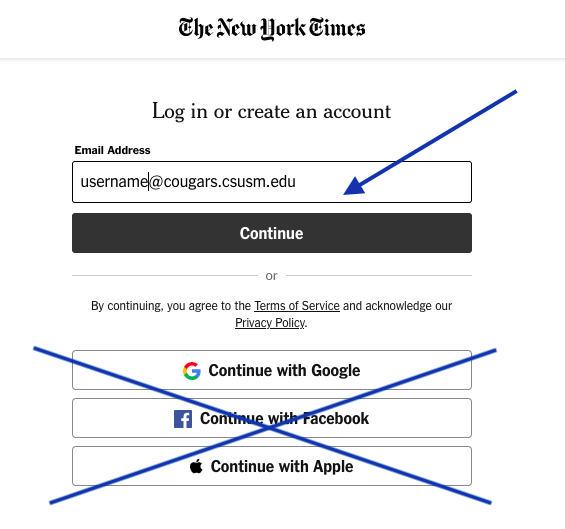
For security, we recommend that you pick a password other than your CSUSM account password.
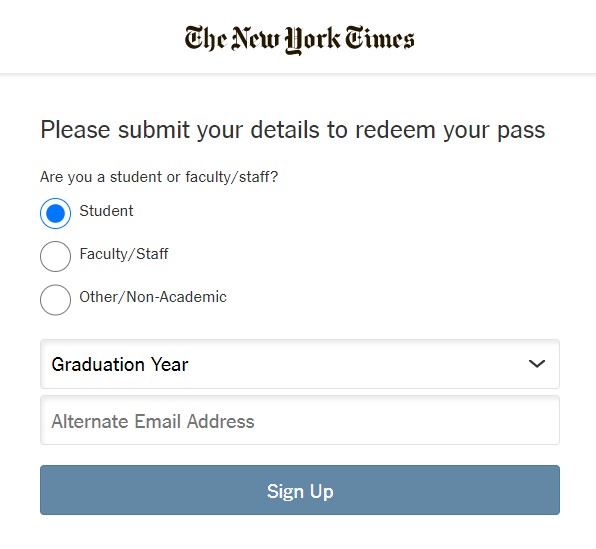
Step 3: Confirm Your New Account
The first time you login, you'll be asked for a few details:
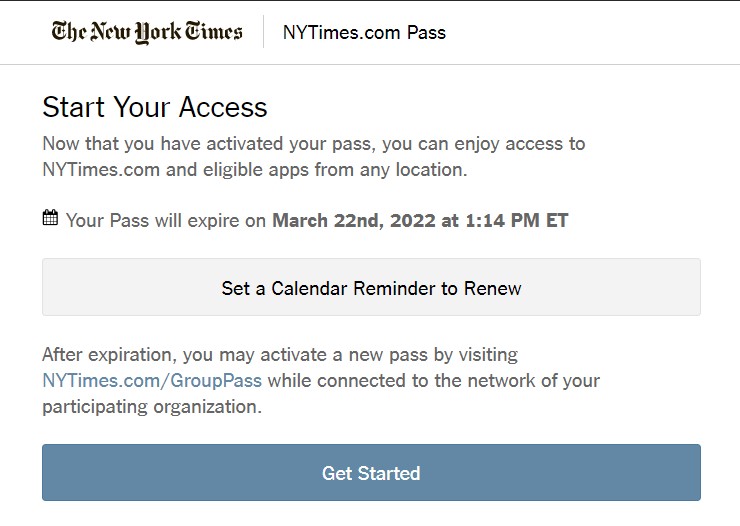
When you've completed the setup, you'll get a confirmation with your account expiration date (if you are still affiliated with the university when your pass expires, you will have to go through these steps again to re-claim your access pass):
Step 4. Login directly to https://nytimes.com with the credentials you just created.
From this point forward, you can use your personal account to log in directly to the New York Times website and access all published content.